
SONULAB MagicMatch
Ever wish you could instantly capture the exact guitar amp tone from your favorite songs? Now you can. MagicMatch from SONULAB is the revolutionary tool that creates a custom tone model in minutes. Forget spending hours downloading and trying out hundreds of patches. Just load a guitar track into MagicMatch, play for a few seconds, and the app does the rest, matching your playing to the reference track to create your unique tone. Download it today, it’s completely free!
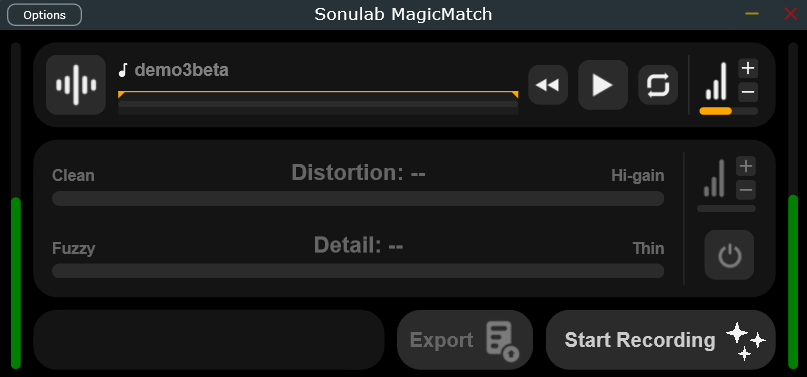
Want to nail that perfect tone? With MagicMatch, it’s easy. This standalone application works on both PC and Mac—all you need is an audio interface.
Once captured, you can use your custom tone inside StompStation or within Sonulab Amp Studio: the MagicMatch plugin!
Original track
MagicMatch track
This is an A/B test to demonstrate MagicMatch’s capabilities. The “MagicMatch track” was created using the “Original track” as a reference, with only a few seconds of DI recording.
Just record a quick 10-30 seconds clip of your playing, and in minutes, the AI will get to work. You don’t have to be precise, a few random notes or wide chords are all it needs. The algorithm analyzes your instrument’s unique “fingerprint,” including its tone and pickup resonances, to create a model that gives you the sound you’re looking for. This offers a direct path to your dream tone, much faster than traditional modeling methods.
How to MagicMatch
Download, open, and get started! Follow these steps and your new tone model will be ready in just a few minutes.
- Click the Load icon
 to import a reference track. Next, MagicMatch will ask you to specify the track’s nature (Clean, Crunch or Lead). Don’t worry – this is simply a starting point for the process and will not affect the final training result.
 - Use the Listen Bar
 to select the specific time interval you’re interested in;
 - First, check your guitar input. Then, hit the “Record” button
 and play your guitar for 10-30 seconds. Wide, rich chords are recommended here. When you’re finished, just click “Stop Recording,” and the training process will begin automatically.
 - The training process typically takes just a minute or two. After it’s complete, you can try out your new tone model and fine-tune it using the two key parameters: Distortion and Detail.
- MagicMatch gives you an empirical starting point
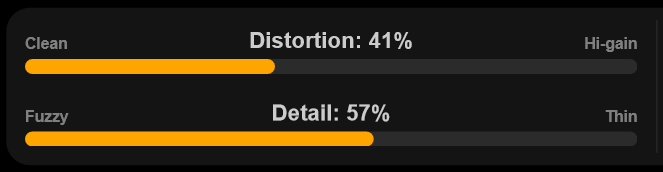 with its Distortion and Detail settings. Feel free to play with them until you get the perfect tone. Distortion controls the amount of saturation, ranging from a clean, pristine sound to a high-gain tone. Detail shapes the character of the distortion, from a muddy/fuzzy tone to a clear/detailed/intellegible one. When editing “Distortion” and “Detail“, you always maintain tonal consistency with the original reference track.
 - Listen to your new tone model and export it
 to use whenever you want.
Once your .vxamp tone model is created, you have three ways to use it: audition it inside MagicMatch, export it to your StompStation hardware, or open it on your desktop within Sonulab Amp Studio: the MagicMatch plugin!
How to find Guitar Tracks
Here are some tips to improve your MagicMatch experience and help you find suitable reference tracks.
- Want to get a sound just like your favorite song? Use a STEM splitter like Voice.ai, Moises.ai, or Lalal.ai to extract the guitar part. Don’t worry if the isolated track has some strange noises or artifacts; it will still have all the information MagicMatch needs to create a natural-sounding model that reflects the underlying tone.
- Searching for “Isolated guitar tracks” on YouTube or similar platforms is a great way to find them! You can either search for a specific song, or check out gold-mine channels like Isolated Tracks.
- Want to capture the exact live tone you listened from your favorite guitarist without endlessly sorting through patches and IRs? Just download the audio track and let MagicMatch do the work!
Here are some guitar tracks you can use as a starting point to experiment with the tool.
Downloads
This is an Experimental BETA release, and your feedback is important. Please let us know if you encounter any issues.
FAQ
How does MagicMatch work?
SONULAB MagicMatch is a free BETA Experimental application that uses Artificial Intelligence and Machine Learning to create custom guitar tones. It works by analyzing the tonal and formant characteristics of a reference track and comparing them to your playing and instrument. Based on this analysis, it generates a full tone model that matches the reference sound. The process doesn’t automatically set the Distortion and Definition levels (it only gives a general estimate), so you’ll need to manually adjust them to achieve the dynamic you want.
Can I use entire songs or just guitar-only tracks?
MagicMatch works best with guitar-only tracks. However, the process is robust enough that you can also experiment with a full mix.
Does MagicMatch work on tracks that have effects on them?
While MagicMatch can’t isolate or replicate effects, the process is very robust and can still work well with tracks that have mild levels of Compression, Reverb, Delay, or Modulation. It will extract a model of just the amplifier’s sound. From there, you can add your own effects to get a result that’s very close to the original amp-and-effects track.
Does MagicMatch work only on guitar?
Although the main design of MagicMatch is for guitar, you can also experiment with other instruments like bass, violin, and more. Feel free to get creative!